

Share a 3D house tour with a client by link
In short: in Layout Studio, make the house 3D, then send the share link by text, WhatsApp or email. The client opens it in the browser on any phone or computer with no account or app, walks every room, and can pin comments to the room they mean.
Asking a client to install software, or to make an account just to see their own house, loses people. A link they tap and walk through works for almost everyone, including parents, partners and the bank manager.
What the client sees
- The house in 3D, which they can walk at eye level, room by room.
- The plan, with room names and sizes.
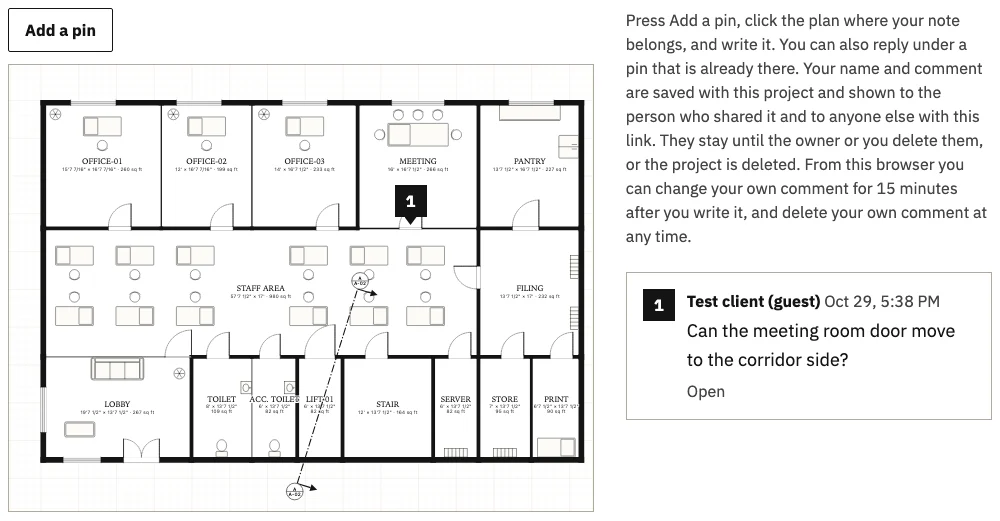
- When you turn comments on, a way to pin a comment to the exact room or spot they mean.
How to send it well
- Walk it yourself first. Check every room before the client does.
- Say what you want back. For example: "Walk the kitchen and tell me if the island feels too big."
- Turn comments on if you want feedback in writing, on the room it is about.
- Send it where the client already talks to you. Text, WhatsApp or email all work, since it is just a link.
Why pinned comments beat phone calls
"Make the room on the left bigger" is unclear. A pin on the plan settles which room a comment means, and the thread stays with the project instead of in someone's phone. When the design is ready for a decision, move to the client pack: see getting client approval on record.
Questions
Does the client need an account? No.
Does it work on a phone? Yes, in the phone's browser.
Can I stop sharing? Yes. You control the link from your project.